Google tweaks its Verify Apps security feature to show what’s been scanned
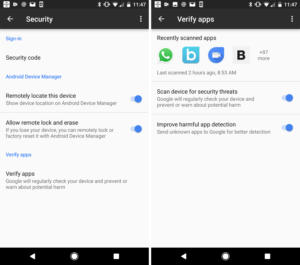
verify-apps-100709505-mediumGoogle has long used its Verify Apps feature to target possible malware before it can affect our phones, but it has always been a behind-the-scenes service. Unless there was an app that Google labeled unsafe and prompted us to remove, there was no way to see if Verify Apps was actually, well, verifying apps. Check out this article from PCWorld.com
Microsoft’s decision to scrap February security updates unnerves patch experts

windows-10-wallpaper-logo-100704141-mediumMicrosoft this week canceled February’s slate of security updates for Windows and its other products, including Office, just a day after saying that the fixes would only be delayed. More of this article from PCWorld.com

The Right Way to Rename Notebooks in OneNote

onenote-features-670x335OneNote is a fantastic free alternative to Evernote, and offers a great place to keep all of your notes handy. Whether you primarily use the desktop app or jot notes on your phone, everything syncs up so it’s ready when you need it. Check out this article from MakeUseOf.com

7 Easy Screen-Sharing and Remote-Access Tools

Remote-Access-Tools-Featured-670x335Do you want to share your Windows screen with a friend or colleague so they can troubleshoot technical issues? Perhaps you want to access your Windows desktop from your tablet to watch a movie in bed? Check out this article from MakeUseOf.com

How to Navigate Your Windows 10 Taskbar With Keyboard Shortcuts

Taskbar-Keyboard-Shortcuts-Featured-670x335Keyboard shortcuts are still the best way to zoom around your computer quickly. We’ve covered the best Microsoft Office shortcuts and even how to make your own shortcuts in case the hundreds of default ones aren’t enough for you. Check out some tips on this article from MakeUseOf.com

How to Disconnect and Uninstall Google Drive From Your PC

Google-Drive-670x335Dropbox and Google Drive. Between the two, Dropbox is preferablex because it’s so hands-free. Get to know more of this article from MakeUseOf.com

Why extracting images from Word is so hard, with 3 decent workarounds

word_primary-100025314-large-100259787-largeExtracting images from Microsoft Word has never been an easy task because Word compresses images (sometimes to as low as 72 dpi) to save memory and keep file sizes small. You can disable the Automatic Picture Compression feature, if you’re the document’s owner, but this step must be performed before the images are inserted. Also, it’s just one of the many steps required to fix this defect. Check out this article from PCWorld.com