Here’s how the Windows 10 Creators Update helps businesses

20160224-stock-mwc-microsoft-windows-10-signs-100647702-orig-100696872-mediumA few weeks ago, Microsoft unveiled its major Windows 10 Creators Update with a focus on the software’s benefits for end users when it launches next year. On Tuesday, the company showed a different side of the next major patch for its new operating system, showing off features that will help IT professionals. Check out this latest article from PCWorld.com


How to reinstall Windows 10 without any bloatware

9-google-play-music-tips-start-an-instant-mix_2-100695054-largeWindows 10 actually has the ability to install just the OS without any additional software. Check out this article from PCWorld.com

How to password protect a PDF before sending it by email

1113-primary-100525782-mediumThe quickest way to do this is to ZIP the PDF file and protect the ZIP file, or use Microsoft Office’s built-in encryption tools to create a password. If you use Outlook, you can use Adobe Acrobat IX to password protect PDFs. You can also try programs like NitroPDF and PDF Encrypt to set the password protection to your PDF file without Acrobat. Check this out from PCWorld.com

Manage Your Microsoft Outlook Email Inbox Like a Boss

email-300x255Don’t let your email inbox drag you down.

Outlook has a wealth of great features that let you manage your inbox, giving you greater control and saving time. You can automatically filter emails using rules and conditional formatting, speed-find what you need using shortcuts and search, and get rid of all that spam using the junk filters. We’ll show you how to best make use of Outlook’s productivity tools. Check out this article from MakeUseOf.com

How Windows 10’s data collection trades your privacy for Microsoft’s security

privacy-policy-538719_1280-100696893-mediumWindows 10’s aggressive data-collection capabilities may concern users about corporate spying, but enterprises have control that consumer-edition Windows users do not: Administrators can decide how much information gets sent back to Microsoft. More of this article from PCWorld.com

6 Reasons Why You Need Google Spaces in Your Life

hqdefaultGoogle Spaces is a group discussion and messaging app that’s also packed with cool social features. It’s like an amalgamation of WhatsApp, Chrome, and Slack. More from this article in MakeUseOf.com

Google makes drawing more powerful with Keep update

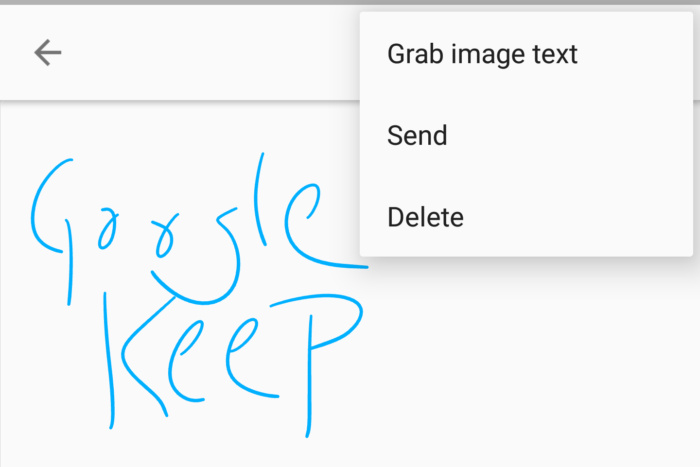
screenshot_20161201-132707-100696651-largeKeep may forever be one of the more underrated apps in Google’s stable, but that hasn’t stopped its development. And there’s a new version on its way to the Play Store that adds a subtle but important new feature for note-takers. Check out this latest article in PCWorld.com